To get started, you will need to install intake-esgf using pip:
python -m pip install intake-esgfor conda-forge:
conda install -c conda-forge intake-esgfNext you will need to import the ESGFCatalog and matplotlib for plotting later in the document.
from intake_esgf import ESGFCatalog
import matplotlib.pyplot as plt
Populate the Catalog
A catalog in intake-esgf initializes empty. This is because while intake-esm
loads a large file-based database into memory, we are going to populate a
catalog by searching one or many index nodes. The ESGFCatalog is configured by
default to query a Globus-based index which has information about holdings at
the Argonne Leadership Computing Facility (ALCF) only. We will demonstrate how
this may be expanded to include other nodes later.
cat = ESGFCatalog()
print(cat)  # <-- nothing to see here yet
Perform a search() to populate the catalog.
To populate the catalog, perform a search using the traditional facets. If you are not familiar with these, we recommend you starting with our Beginner’s Guide to ESGF tutorial.
cat.search(
    experiment_id="historical",
    source_id="CanESM5",
    frequency="mon",
    variable_id=["gpp", "tas", "pr"],
)Summary information for 195 results:
mip_era [CMIP6]
activity_drs [CMIP]
institution_id [CCCma]
source_id [CanESM5]
experiment_id [historical]
member_id [r10i1p1f1, r10i1p2f1, r11i1p1f1, r11i1p2f1, r...
table_id [Amon, Lmon]
variable_id [pr, tas, gpp]
grid_label [gn]
dtype: objectThe search has populated the catalog where results are stored internally as a
pandas dataframe, where the columns are the facets common to ESGF. Printing the
catalog will display each column as well as a possibly-truncated list of unique
values. We can use these to help narrow down our search. In this case, we
neglected to mention a member_id (also known as a variant_label). So we can
repeat our search with this additional facet. Note that searches are not
cumulative and so we need to repeat the previous facets in this subsequent
search. Also, while for the tutorial’s sake we repeat the search here, in your
own analysis codes, you could simply edit your previous search.
cat.search(
    experiment_id="historical",
    source_id="CanESM5",
    frequency="mon",
    variable_id=["gpp", "tas", "pr"],
    variant_label="r1i1p1f1",  # addition from the last search
)Summary information for 3 results:
mip_era [CMIP6]
activity_drs [CMIP]
institution_id [CCCma]
source_id [CanESM5]
experiment_id [historical]
member_id [r1i1p1f1]
table_id [Amon, Lmon]
variable_id [pr, tas, gpp]
grid_label [gn]
dtype: objectObtaining the datasets
Now we see that our search has located 3 datasets and we are now ready to load these into memory. The catalog will again communicating with the index node and request file information. This includes which file or files are part of the datasets, their local paths, download locations, and verification information. Internally we then try to make an optimal decision in getting the data to you as quickly as we can.
If you are running on a resource with direct access to the ESGF holdings (such a Jupyter notebook on
nimbus.llnl.gov), then we check if the dataset files are locally available. We have a handful of locations built-in tointake-esgfbut you can also set a location manually withcat.set_esgf_data_root().If a dataset has associated files that have been previously downloaded into the local cache, then we will load these files into memory.
If no direct file access is found, then we will queue the dataset files for download. File downloads will occur in parallel from the locations which provide you the fastest transfer speeds. Initially we will randomize the download locations, but as you use
intake-esgf, we keep track of which servers provide you fastest transfer speeds and future downloads will prefer these locations. Once downloaded, we check file validity, and load intoxarraycontainers.
dsd = cat.to_dataset_dict(ignore_facets='table_id'){'pr': <xarray.Dataset> Size: 65MB
Dimensions: (time: 1980, bnds: 2, lat: 64, lon: 128)
Coordinates:
* time (time) object 16kB 1850-01-16 12:00:00 ... 2014-12-16 12:00:00
* lat (lat) float64 512B -87.86 -85.1 -82.31 ... 82.31 85.1 87.86
* lon (lon) float64 1kB 0.0 2.812 5.625 8.438 ... 351.6 354.4 357.2
Dimensions without coordinates: bnds
Data variables:
time_bnds (time, bnds) object 32kB dask.array<chunksize=(1980, 2), meta=np.ndarray>
lat_bnds (lat, bnds) float64 1kB dask.array<chunksize=(64, 2), meta=np.ndarray>
lon_bnds (lon, bnds) float64 2kB dask.array<chunksize=(128, 2), meta=np.ndarray>
pr (time, lat, lon) float32 65MB dask.array<chunksize=(1980, 64, 128), meta=np.ndarray>
areacella (lat, lon) float32 33kB dask.array<chunksize=(64, 128), meta=np.ndarray>
Attributes: (12/55)
CCCma_model_hash: 3dedf95315d603326fde4f5340dc0519d80d10c0
CCCma_parent_runid: rc3-pictrl
CCCma_pycmor_hash: 33c30511acc319a98240633965a04ca99c26427e
CCCma_runid: rc3.1-his01
Conventions: CF-1.7 CMIP-6.2
YMDH_branch_time_in_child: 1850:01:01:00
... ...
variant_label: r1i1p1f1
version: v20190429
license: CMIP6 model data produced by The Government ...
cmor_version: 3.4.0
activity_drs: CMIP
member_id: r1i1p1f1,
'tas': <xarray.Dataset> Size: 65MB
Dimensions: (time: 1980, bnds: 2, lat: 64, lon: 128)
Coordinates:
* time (time) object 16kB 1850-01-16 12:00:00 ... 2014-12-16 12:00:00
* lat (lat) float64 512B -87.86 -85.1 -82.31 ... 82.31 85.1 87.86
* lon (lon) float64 1kB 0.0 2.812 5.625 8.438 ... 351.6 354.4 357.2
height float64 8B ...
Dimensions without coordinates: bnds
Data variables:
time_bnds (time, bnds) object 32kB dask.array<chunksize=(1980, 2), meta=np.ndarray>
lat_bnds (lat, bnds) float64 1kB dask.array<chunksize=(64, 2), meta=np.ndarray>
lon_bnds (lon, bnds) float64 2kB dask.array<chunksize=(128, 2), meta=np.ndarray>
tas (time, lat, lon) float32 65MB dask.array<chunksize=(1980, 64, 128), meta=np.ndarray>
areacella (lat, lon) float32 33kB dask.array<chunksize=(64, 128), meta=np.ndarray>
Attributes: (12/55)
CCCma_model_hash: 3dedf95315d603326fde4f5340dc0519d80d10c0
CCCma_parent_runid: rc3-pictrl
CCCma_pycmor_hash: 33c30511acc319a98240633965a04ca99c26427e
CCCma_runid: rc3.1-his01
Conventions: CF-1.7 CMIP-6.2
YMDH_branch_time_in_child: 1850:01:01:00
... ...
variant_label: r1i1p1f1
version: v20190429
license: CMIP6 model data produced by The Government ...
cmor_version: 3.4.0
activity_drs: CMIP
member_id: r1i1p1f1,
'gpp': <xarray.Dataset> Size: 65MB
Dimensions: (time: 1980, bnds: 2, lat: 64, lon: 128)
Coordinates:
* time (time) object 16kB 1850-01-16 12:00:00 ... 2014-12-16 12:00:00
* lat (lat) float64 512B -87.86 -85.1 -82.31 ... 82.31 85.1 87.86
* lon (lon) float64 1kB 0.0 2.812 5.625 8.438 ... 351.6 354.4 357.2
type |S4 4B ...
Dimensions without coordinates: bnds
Data variables:
time_bnds (time, bnds) object 32kB dask.array<chunksize=(1980, 2), meta=np.ndarray>
lat_bnds (lat, bnds) float64 1kB dask.array<chunksize=(64, 2), meta=np.ndarray>
lon_bnds (lon, bnds) float64 2kB dask.array<chunksize=(128, 2), meta=np.ndarray>
gpp (time, lat, lon) float32 65MB dask.array<chunksize=(1980, 64, 128), meta=np.ndarray>
areacella (lat, lon) float32 33kB dask.array<chunksize=(64, 128), meta=np.ndarray>
sftlf (lat, lon) float32 33kB dask.array<chunksize=(64, 128), meta=np.ndarray>
Attributes: (12/55)
CCCma_model_hash: 3dedf95315d603326fde4f5340dc0519d80d10c0
CCCma_parent_runid: rc3-pictrl
CCCma_pycmor_hash: 33c30511acc319a98240633965a04ca99c26427e
CCCma_runid: rc3.1-his01
Conventions: CF-1.7 CMIP-6.2
YMDH_branch_time_in_child: 1850:01:01:00
... ...
variant_label: r1i1p1f1
version: v20190429
license: CMIP6 model data produced by The Government ...
cmor_version: 3.4.0
activity_drs: CMIP
member_id: r1i1p1f1}You will notice that progress bars (not shown)inform you that file information
is being obtained and that downloads are taking place. As files are downloaded,
they are placed into a local cache in ${HOME}/.esgf (the location is
configurable) in a directory structure that mirrors that of the
remote storage. For future analysis which uses these datasets, intake-esgf
will first check this cache to see if a file already exists and use it instead
of re-downloading. Then it returns a dictionary whose keys are by default the
minimal set of facets to uniquely describe a dataset in the current search.
Now that we have downloaded/accessed the data and loaded it into memory, we can look at the keys of the resulting dictionary.
print(dsd.keys())dict_keys(['pr', 'tas', 'gpp'])
By default the keys are populated using the different facet values in the dictionary. However, you have a lot of control on the form that they take. During the download process, you may have also noticed that a progress bar informed you that we were adding cell measures. We add cell measures automatically to your datasets by looking at the attributes to determine what is needed.
Plots
fig, axs = plt.subplots(figsize=(6, 12), nrows=3)

# temperature
ds = dsd["tas"]["tas"].mean(dim="time") - 273.15  # to [C]
ds.plot(ax=axs[0], cmap="bwr", vmin=-40, vmax=40, cbar_kwargs={"label": "tas [C]"})

# precipitation
ds = dsd["pr"]["pr"].mean(dim="time") * 86400 / 999.8 * 1000  # to [mm d-1]
ds.plot(ax=axs[1], cmap="Blues", vmax=10, cbar_kwargs={"label": "pr [mm d-1]"})

# gross primary productivty
ds = dsd["gpp"]["gpp"].mean(dim="time") * 86400 * 1000  # to [g m-2 d-1]
ds.plot(ax=axs[2], cmap="Greens", cbar_kwargs={"label": "gpp [g m-2 d-1]"})
plt.tight_layout()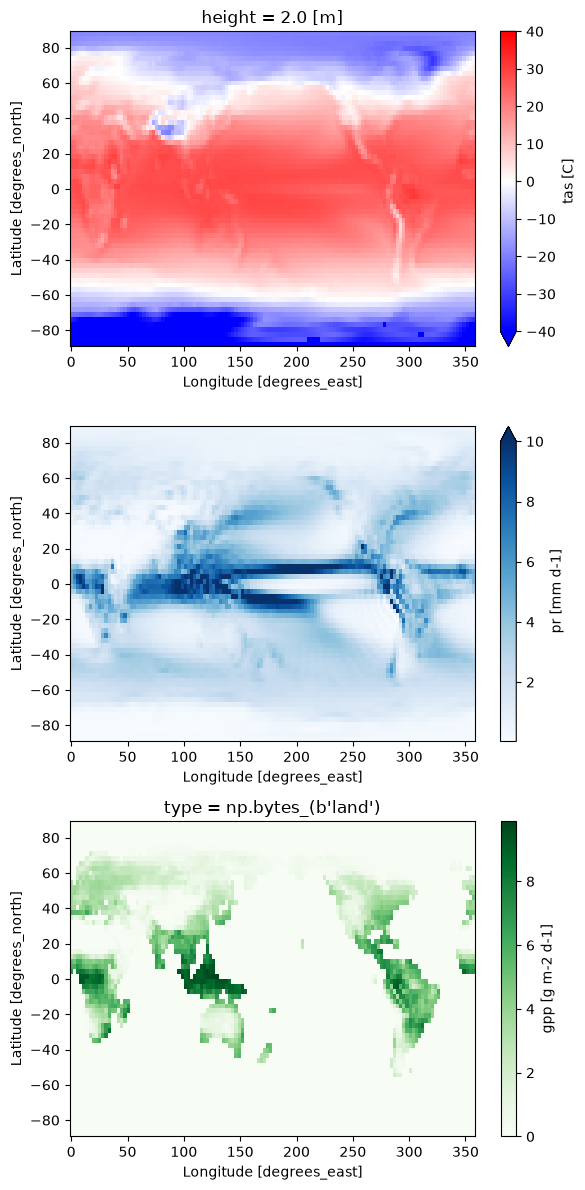
Summary
intake-esgf becomes the way that you download or locate data as well as load
it into memory. It is a full specification of what your analysis is about and
makes your script portable to other machines or even in use with serverside
computing. We are actively developing this codebase. Let us
know what other features you
would like to see.